
EVENT REGISTRANT INFORMATION & RESOURCES
Thank you for attending NCACPA’s 86th Annual Symposium!
Registration for the conference will open at 7:00 AM on Monday, November 17 in the Grand Ballroom where breakfast will also be provided.
Maximize your time at the event with the
NCACPA Conferences mobile app
Easily view the Schedule, Speakers, Photo Gallery, Instant Alerts and more! You can even create personalized lists to target what you want to see, hear & do.
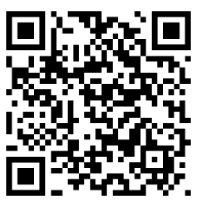
App Download Instructions:
For iPhone and Android users: To download the NCACPA Conferences app visit tripbuildermedia.com/apps/ncacpa
This link will automatically detect your phone type and take you to the right place to download the app on the Apple App Store or Google Play Store. Or, just scan this QR Code & download the app now!
Logging into the App:
On the login screen, enter your username and the password in which you have set via the login credentials email or via the Reset Password link on the login screen.
On the app login screen click the Reset Password link. Enter in your email address in which you’ve registered for the event with and this will send you an email that contains the link to set your password.
Once you have set your password, please navigate back to the login screen of the mobile app and enter in your email address as your username and the password you’ve recently set.
Navigating the Schedule:
The schedule is sorted by date and then time within the day. Click the All toggle to see all sessions for the selected day. While at the event, click the Now toggle to see all sessions happening at that specific date and time. Click the magnifying glass to search the schedule by keywords to find applicable sessions. Click the funnel icon to filter the schedule by specific filter categories. Click into any session to see more information and details about the session along with information about the session’s presenters.
Personalizing Your Experience:
Create your personalized lists (such as your MySchedule or your MyContacts list) by clicking on the empty circle for each specific entry so a check mark appears for that entry (if an entry has a check mark on it that means it has been added to your MyEvent). To then access your personalized lists, click the MyEvent icon from the home screen of the app.
Be Social:
Interact with fellow attendees by uploading/sharing photos to the in-app Gallery. Post comments and questions on the Social Feed to connect with fellow attendees about topics of interest.
Attendee Networking:
Easily Connect with fellow attendees via the Let’s Meet button on the attendee list. This will enable you to send an initial email through the app to the intended recipient. The recipient can then choose to respond back to you directly via email. Email addresses are protected on the app until you choose to share it with a fellow attendee. Sort the attendee list alphabetically by Name or by Company to easily find who you’re looking for.
CONFERENCE MATERIALS
Below is a listing of sessions for this program accompanied by the materials, if available. Click on the button to print materials or download them to your preferred device. Once you download materials, refunds will not be issued. NCACPA will post materials to the registrant only page as they are received by the instructor prior to the event.
DAY 1: MONDAY, NOVEMBER 17
(GS1) AI: Overcoming the Hype and Discovering the Opportunity
(2C) Auditing Standards Board (ASB) Updates
(GS2) Federal Tax Update
(3A) Mastering Your Firm’s Life Cycle: Growth, Collaboration, and Succession Through Skill Development
(GS3) Advocacy, Tax and Legislative Hot Topics
(3B) Employment Law Updates 2025
(1A) Liquidation of Flow-Through Entities for LLCs and Partnerships (LFTE)
(3C) Rebuilding After Fraud
DAY 2: TUESDAY, NOVEMBER 18
(GS4) Ethical Choices
(5B) FAQ for Accounting and Disclosure When Faced With Uncertainty – Such as Natural Disasters and the Economy
(GS5) Future Ready Finance: Motivating the Next Workforce
(5C) Get Started with Power BI
(GS6) Professional Update (Panel)
(5D) NC Sales Tax Review & Update
(4A) Trusts Under the Big Beautiful Bill: Key Planning Impacts and Considerations
(6A) The Big Beautiful Bill and Entity Planning: S Corporations, C Corporations, and LLC Strategies
(4B) Critical Thinking in a Changing World
(6B) Embedding Enterprise-Risk Management Principles into Accounting and Finance
(4C) Become a Data Analysis Expert
(6C) The Must Know Features of Excel
(4D) Performing a State Nexus Study in an Ever-Changing State Tax Environment
(6D) Property Tax Exemptions and Exclusions in NC: Guiding you from A to Z
(5A) Financial Planning After the Big Beautiful Bill: What CPAs Need to Watch
DAY 3: WEDNESDAY, NOVEMBER 19
(GS7) NC State Tax Update
(7D) NCDOR Status on Modernization Projects
(GS8) Economic Outlook
(8A) Smarter Security: Creating a Cybersecurity Strategy That Fits Your Firm
(7A) The Truth About Strategic Change: External Forces vs. Internal Motivation
(8C) Ethics Under Fire: When Family Drama Meets Financial Duty
(7B) Ethical AI or Organized Chaos
(8D) NC Individual Income Tax Update
(7C) From Technician to Trailblazer: Reimagining the Role of a Firm Leader in a Time of Disruption
(9A) The CPA’s Secret Weapon: Unlocking Massive Tax Savings
(9B) AI Real Use Tools
(9C) Relationships to Revenue: How Your Accounting Firm Can Build Referral Partnerships to Develop New Business Opportunities
Attendee Quick Links
Links will be made available at the end of each day.
Conference Survey: Please take a few moments to fill out the survey(s) regarding the speakers, objectives, and overall program experience for each day you attended. Your feedback is valuable to the association, and your evaluation helps NCACPA continue to offer high-quality CPE programming.
CPE Certificate of Completion: Select the link for each day you attended to retrieve your CPE Certificate of Completion. Please make sure you are selecting the correct format (in-person or virtual.) You’ll be prompted to enter your name, select sessions, time spent in each session, and email address. Once the form is completed, your Certificate of Completion will be generated.
I am an in-person attendee…
I am a virtual attendee…
Day 1
Day 1
Day 2
Day 2
Day 3
Day 3
THANK YOU TO OUR 2025 SPONSORS!